
Hardware
€2,000one-time
Projection stand, configurable fixture and projector. Shared by both applications.
Step-by-step projection guidance for manual pipetting and plate-based corrections.
Manual pipetting is often needed to prepare samples for the next laboratory step. The right material has to reach the right well in the right volume, whether the task is routine plate preparation, a sample transfer or a correction to an existing plate.
A screen or paper worklist can specify the plate, well, volume and sequence, but the operator must continuously translate that information to the physical plate. Switching attention between the instruction and the bench adds mental load, particularly during corrections, exceptions or non-sequential steps.
LightPick projects the active well and step-specific instruction directly onto the plate. The required position, action and volume stay visible at the work surface, while the workflow continues to be defined by the LIMS or other source system.

Without guidance at the plate, labs generally choose between manual execution from a worklist and a liquid-handling robot. Manual work remains flexible for small batches and exceptions, but depends on the operator applying every instruction correctly. Automation removes that manual step, but requires more investment and setup and works best for stable, repeatable workflows.
LightPick adds guidance while leaving the operator in control. Existing pipettes, plates and procedures remain in use, and projection presents the current instruction at the bench. This provides physical support without transferring the complete process to a robot.
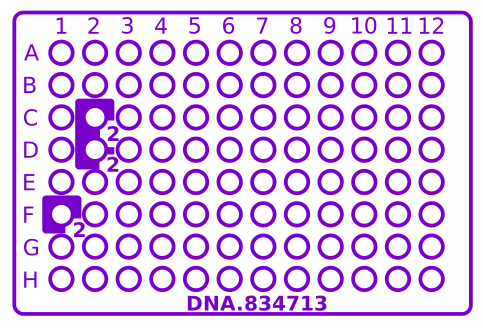
Example of projected well guidance.
Visual guidance helps prevent pipetting into the wrong well.
The current instruction stays visible at the place where the action is performed.
Instructions can account for alternatives and corrections defined by the source workflow.
Scans and indicated actions can be logged and reported back to the LIMS.
Pipetting guidance uses the same projection stand, configurable fixture, projector and LightPick software as tube picking.
LightPick receives instructions through a simple API or file-based interface. The LIMS defines the allowed actions; LightPick presents those instructions at the work surface.
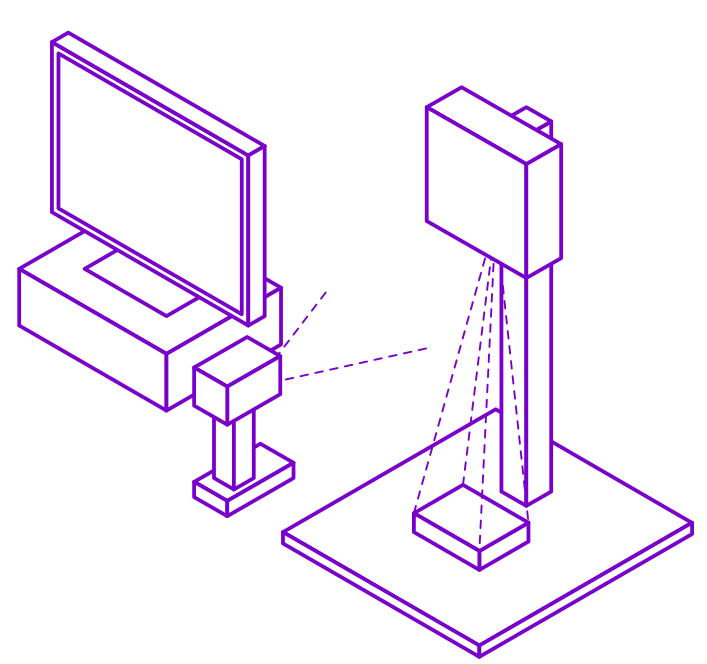
LightPick workstation layout.
One LightPick hardware setup can be used for both tube picking and pipetting. The hardware is purchased once; software and support are licensed separately for each application.
€2,000one-time
Projection stand, configurable fixture and projector. Shared by both applications.
€2,000per application / year
Application software, updates, documentation and email support.
€150per hour
LIMS integration and application-specific customization.
Contact us for a quotation or questions about plate formats, workstation requirements, software licensing, shared hardware or integration with your LIMS.
Ask about purchasing